For PC builders aiming to maximize airflow and keep noise in check, a PWM fan hub can simplify motherboard wiring while delivering precise, synchronized cooling. The following five hubs were selected for their balance of port count, power delivery, and ease of use. Each product supports PWM-controlled fans, with some offering ARGB options for coordinated lighting. This guide compares capabilities, helps you pick the right hub for your system, and provides practical guidance on installation and setup.
| Product | Brand | Key Benefit | Ports | Power |
|---|---|---|---|---|
| ARCTIC Case Fan Hub 10‑Fold PWM | ARCTIC | Expands fan headers with synchronous PWM control | 10 total slots (9 expansion) | SATA Power |
| ASUS TUF ARGB PWM Fan Hub | ASUS | Six fans plus PWM and RGB connections with indicators | 6 fans + PWM + RGB | Dual SATA Power |
| SilverStone SST‑CPF04‑USA | SilverStone | Stable voltage with large capacitor and speed detection | 8 PWM ports | SATA Power |
| Thermaltake Commander FP | Thermaltake | High-port-count hub with direct SATA power and mounting kit | 10 PWM ports | SATA Power |
| ShakingTank ARGB PWM 9-Port Hub | Shaking Tank | 9 PWM ports plus ARGB and magnetic backplane | 9 PWM ports; 9 ARGB ports | SATA Power |
ARCTIC Case Fan Hub 10‑Fold PWM
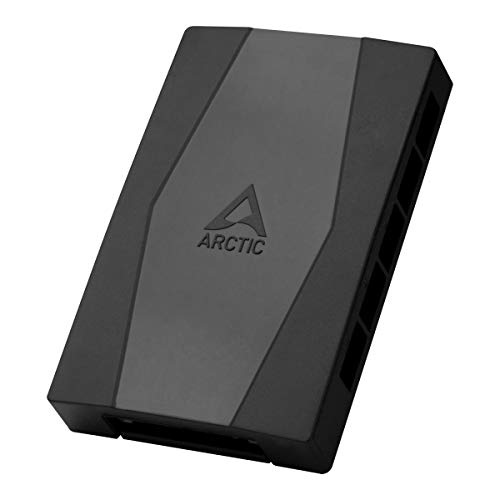
The ARCTIC Case Fan Hub is designed to expand cooling capacity without cluttering the motherboard with additional fan headers. It routes the motherboard’s PWM signal to all connected fans synchronously, ensuring coordinated RPM control across the entire bank of fans. The hub is intended for placement inside the PC chassis, keeping cables out of sight while providing a single, central connection back to the motherboard. With SATA power, it can deliver stable voltage even when multiple fans ramp up, minimizing RPM fluctuation and maintaining predictable cooling performance. It also reads back the RPM from the first connected fan to confirm operation.
- Synchronous fan control distributes the PWM signal to all fan slots
- Expandable by up to nine additional fan slots, increasing overall airflow
- One motherboard connection simplifies cable management
- SATA power support provides stable operation under load
- Compact placement inside the case for neat builds
ASUS TUF ARGB PWM Fan Hub

The ASUS TUF Gaming ARGB PWM Fan Hub provides a compact solution for syncing cooling and lighting across up to six fans, while accommodating a PWM connection for speed control and an RGB connector for lighting effects. The hub includes visible power and operation indicators to simplify monitoring during assembly or tuning. It is designed to integrate with a motherboard’s PWM signal and supports dual SATA power to maintain stable voltage as the fan lineup grows. This makes it a strong fit for mid-sized builds where RGB synchronization matters alongside cooling performance.
- Up to six fans with PWM and RGB connections
- Visible power and operation indicators for quick status checks
- Synchronizes fan speeds and lighting across connected devices
- Dual SATA power support for stable operation
- Compact, clean mounting footprint
SilverStone SST‑CPF04‑USA

SilverStone’s SST‑CPF04‑USA offers eight PWM outputs in a compact hub designed for multi-fan rigs. The unit emphasizes voltage stability, leveraging a 2200 µF capacitor to smooth regulation under load. It supports speed detection to help you set precise fan speeds and monitor RPMs, improving reliability in complex builds with multiple radiators or chassis fans. The hub’s straightforward approach makes it a practical option when you want dependable, predictable fan performance without advanced lighting features.
- 1-to-8 PWM connectors for broad expansion
- Large capacitor stabilizes voltage under load
- Speed detection supports accurate RPM control
- Simple, robust design suitable for dense fan setups
Thermaltake Commander FP

The Thermaltake Commander FP is a high-capacity fan hub designed for larger builds, offering a direct SATA-powered interface that can drive multiple PWM fans from a single PSU connection. It supports up to ten PWM fans and can power up to nine fans simultaneously, reducing risk of voltage drop and providing consistent performance as fans ramp up. The package includes cable ties and Velcro strips for tidy installation, plus a PWM signal cable to guarantee synchronized control. This hub is well suited for full-tower cases or gaming rigs with substantial cooling needs.
- Ten independent PWM fan connections
- Direct SATA power input supports multiple fans
- Powers up to nine PWM fans simultaneously
- Includes mounting hardware and cable management accessories
ShakingTank ARGB PWM 9-Port Hub

The ShakingTank ARGB PWM 9-Port Hub integrates ARGB and PWM control across a nine-port hub, enabling synchronized fan speeds with ARGB lighting across the system. Each port supports PWM to manage fan RPM while the 5V 3-pin ARGB connections allow lighting effects to match the cooling profile. A magnetic backplane design makes installation convenient by allowing secure placement on metal surfaces without tape. This hub is particularly appealing for builds that emphasize both performance cooling and vibrant lighting schemes.
- 9 PWM ports plus 9 ARGB ports for full lighting integration
- 5V 3-pin ARGB support for synchronized lighting
- Magnetic back design for easy placement and cleanup
- Compatible with a wide range of fans and ARGB strips
Buying Guide
Choosing the right PWM fan hub depends on your PC’s cooling needs, space, and ambitions for aesthetics. Consider the following factors to help you decide which hub fits best:
- Port count and expansion: Determine how many PWM fans you plan to run. If you expect growth or have radiators and multiple chassis fans, a hub with more ports will reduce motherboard header strain and simplify wiring.
- Power delivery: Hubs pull power either from SATA or other PSU-compatible sources. SATA-powered hubs tend to provide more stable current for multiple fans. Ensure the total wattage and per-port limits align with your fan lineup.
- PWM synchronization and feedback: A core benefit is uniform RPM across connected fans. Some hubs also read back RPM to verify operation, which helps with tuning and monitoring.
- ARGB and lighting support: If you want coordinated lighting, select a hub that offers ARGB ports. Verify the type of ARGB (5V, 3-pin) and compatibility with your fans or LED strips.
- Fan compatibility: Most hubs support 4-pin PWM fans; some also accommodate 3-pin fans, though performance may vary. Check whether 3-pin support is offered if you own older fans.
- Form factor and installation: Consider whether the hub’s size fits your case and how the included mounting hardware or magnets aid installation. Cable management features, such as Velcro ties and long cables, improve tidiness.
- Reliability and safety: Look for hubs with solid connectors, stable voltage delivery, and protections against overcurrent or short circuits, especially when powering multiple fans.
- Price-to-feature balance: Higher port counts and ARGB capabilities add value for enthusiasts, but ensure the hub’s capabilities meet your planned configuration without paying for unused extras.
How to Choose Among These Hubs
- Best overall expansion: For cases needing many fans with synchronized control, Thermaltake Commander FP offers a robust 10-port solution with reliable SATA power and included mounting hardware.
- Best for ARGB integration: If lighting synchronization matters, ShakingTank’s 9 PWM ports plus 9 ARGB ports provide a cohesive lighting and cooling setup.
- Best value and reliability: SilverStone SST‑CPF04‑USA delivers 8 PWM ports with stable voltage, a straightforward setup, and reliable speed control.
- Compact and tidy build: ASUS TUF ARGB PWM Fan Hub offers six fans with PWM and RGB, plus clear indicators to monitor status in smaller systems.
- High expandability in a compact form: ARCTIC Case Fan Hub focuses on expanding fan headers with synchronous control in a streamlined package for cases with limited space.
When integrating these hubs, plan your wiring layout in advance: group power cables neatly, route fan cables to avoid obstructing fans or intake/outlets, and keep power and signal lines separate to reduce interference. If your build uses a variety of fans (4-pin PWM and 3-pin), verify compatibility and reader back features to ensure consistent performance across all fans. Finally, test the system under load to confirm that RPMs, temperatures, and lighting behave as intended before final chassis assembly.